

Best Image to Video Tools For Faster Campaign Iteration
Creative work often slows down at the wrong stage. Teams can develop strong static visuals, approve them, and even know exactly where those visuals should appear, but still get stuck when they need motion versions for ads, landing pages, or short-form social distribution. That is where Image to Video AI stands out in a practical way. Instead of forcing users into a full production mindset, it presents image animation as a short online workflow built around existing assets.
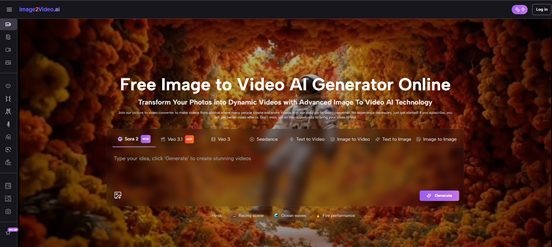
That distinction matters because image-to-video is not always about spectacle. Quite often, it is about extending the value of approved imagery. A product shot, a fashion image, a portrait, a travel still, or an event photo already contains most of the creative decisions that matter. Framing, color, subject emphasis, and mood are already there. The next question is simply how to add movement without rebuilding everything from scratch.
In my observation, the most useful platforms in this category are not necessarily the ones that look the most futuristic in demo reels. They are the ones that help users test motion ideas quickly, understand what kind of result to expect, and repeat the process without too much friction. That is the lens I am using for this ranking of eight image-to-video platforms.
That is also why Photo to Video is worth understanding as a production shortcut rather than a decorative effect. When a team already has approved visuals, the real value lies in turning those still assets into more flexible campaign materials without reopening the whole creative process.
What This Ranking Tries To Solve
A broad list of tools is easy to make. A useful list is harder. Most people do not need a random collection of names. They need to know which tool fits a specific kind of workflow.
The workflow question matters more than hype
Some platforms are better when the user wants cinematic motion from a single still. Others are better when the user wants to experiment rapidly across many assets. Some are designed like creative ecosystems. Others succeed because they keep the path simple.
That means the best tool is not universal. But there is still a meaningful difference between a platform that reduces friction and one that increases it.
Why image-based video is becoming important
Static assets are often easier and cheaper to create than full live-action video. That is why the idea of animating still images has become so attractive. It lets teams repurpose existing visuals into clips that feel more alive and more suitable for current distribution habits.
Movement changes attention without changing the message
A subtle camera push, a gentle pan, or a more dynamic animated interpretation can shift how an image performs without changing the core creative idea. That makes image-to-video especially relevant for marketers, creators, and small teams who need more output from the assets they already have.
The Eight Platforms In Ranked Order
1. Image to Video AI
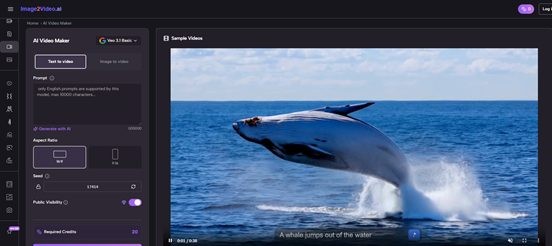
Image to Video AI ranks first because it is unusually direct about the problem it is solving. Its public pages are built around the idea of turning photos into videos with AI-powered motion and transitions, using a web-based workflow that does not ask for editing experience. For ordinary users, that clarity is a real advantage.
I also think its positioning is strong because it stays close to recognizable use cases. The platform talks about social posts, product showcases, event recaps, and tutorials. Those are real publishing contexts, not vague creative fantasies. When a product clearly signals where it fits, adoption becomes easier.
Another reason for the top placement is that it appears intentionally lightweight. The public workflow suggests a low-friction route from image upload to generated clip. That makes it an especially good choice for teams who want motion variation without moving into a full production pipeline.
2. Runway
Runway remains one of the strongest names in AI video overall because it combines generation with a broader set of creative controls. For image-to-video, that wider environment can be valuable when users expect to experiment, refine, and keep building beyond the first output.
It ranks second here because its broader strength can also create more complexity. That is excellent for advanced users, but not always ideal for someone who simply wants to test motion from still images quickly.
3. Luma
Luma scores highly because it consistently leans into cinematic transformation. When users want still images to feel more film-like, more atmospheric, or more visually elevated, Luma is often part of the conversation for good reason.
The reason it does not take first place in this ranking is that the focus here is campaign iteration and practical speed. Luma can be powerful, but some users will still find a more direct image-first workflow easier to adopt.
4. Kling
Kling is strong when the goal is visually ambitious motion. It tends to attract users who want a still image to become something more dramatic than a lightly animated asset. That makes it exciting, especially for standout visuals.
Its tradeoff is that visually ambitious generation can require more patience. In my testing across this category, the more a tool pushes toward cinematic transformation, the more users often need to curate multiple outputs.
5. Pika
Pika deserves credit for accessibility. It makes AI video feel less intimidating, which is useful for users crossing over from static design or image generation into motion. For experimentation and rapid ideation, that can be a real strength.
Its ranking here reflects a balance: very approachable, but not always the first platform I would choose when campaign repeatability matters more than playful exploration.
6. PixVerse
PixVerse has strong momentum in the space and clearly supports image-based creation. It is often attractive for short-form content and quick visual animation, particularly when users want energetic outputs.
The reason it sits lower is not lack of relevance. It is that some users may see it as stronger for trend-friendly experimentation than for systematic creative operations across many brand assets.
7. VEED
VEED belongs on this list because many teams do not want generation alone. They want to generate, adjust, and export in one browser environment. In that context, VEED is useful because it connects image-based AI with a fuller video workflow.
But if the question is which platform feels most purpose-built around turning still images directly into AI motion, other tools feel more focused.
8. Haiper
Haiper still deserves attention because it offers an image-to-video path and keeps the barrier to testing relatively low. It can be useful for creators who want another option for lightweight experimentation.
Its lower rank reflects confidence and breadth rather than total ability. When users are deciding where to build a repeatable motion workflow, some other names currently feel more established.
Comparison Table For Real-World Selection
|
Rank |
Platform |
Best Use Case |
Why People Choose It |
Possible Drawback |
|
1 |
Image to Video AI |
Repurposing approved visuals |
Clear browser-first image workflow |
Less positioned as an all-in-one studio |
|
2 |
Runway |
Advanced iterative creation |
Strong creative ecosystem and controls |
Higher learning overhead |
|
3 |
Luma |
Cinematic storytelling from stills |
Polished visual ambition |
Can be more than simple users need |
|
4 |
Kling |
Bold motion experiments |
Dramatic and visually ambitious results |
More output variation across attempts |
|
5 |
Pika |
Fast exploration |
Friendly and approachable workflow |
Less suited to strict repeatability |
|
6 |
PixVerse |
Short-form animated content |
Fast and energetic generation |
Can feel more trend-led than workflow-led |
|
7 |
VEED |
Generate plus edit in browser |
Strong post-generation utility |
Less centered on image-first generation alone |
|
8 |
Haiper |
Lightweight testing |
Easy path for experimentation |
Lower confidence for some professional users |
Why The Top Spot Goes To Image to Video AI
The answer is not just quality claims. It is product fit.
It starts where many users already are
A lot of users are not beginning with a screenplay or a timeline. They are beginning with a finished image. That image may come from a designer, a photographer, an ad team, or an earlier AI workflow. Image to Video AI seems to understand that reality and builds around it.
The public workflow feels practical
The platform’s public product pages repeatedly emphasize turning photos into polished videos through a direct online process. That framing matters because it reduces uncertainty. A user does not have to wonder whether the product was really built for still-image animation. It clearly is.
Practical framing is underrated
In software, clarity is often more valuable than a long feature list. A creator is much more likely to use a tool consistently if the first experience makes sense immediately. That is one reason the platform stands above broader or more complex competitors for this specific use case.
The Official Process In Three Short Steps
One reason the platform is easy to understand is that the visible workflow is compact.
Step 1: Upload your photos
The process starts with image upload. That makes it a good match for existing product images, campaign visuals, memory photos, and other still assets.
Step 2: Describe the motion you want
The next step is to tell the platform what kind of movement or visual effect you want. This matters because the user is guiding intent rather than editing frame by frame.
Step 3: Generate a video in the browser
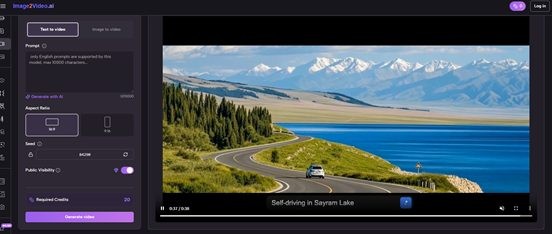
The platform then creates a video clip online, with motion and transitions added automatically. The browser-based nature of the process is part of the appeal, especially for users who want to avoid heavyweight editing software.
How Different Users Might Choose Differently
A good ranking should still leave room for nuance. Not every user should choose the same platform.
Marketers may prioritize speed
If the goal is to turn campaign stills into quick motion assets for tests, a direct workflow often matters more than deep controls. That is where Image to Video AI and similar platforms make strong sense.
Creative directors may want more range
A user working on concept development or mood-rich storytelling may prefer the broader creative possibilities of Runway, Luma, or Kling, even if the process is slightly less simple.
Social creators may prefer experimentation
Short-form creators sometimes care more about visual punch and iteration volume than strict brand consistency. In those cases, Pika or PixVerse can become especially attractive.
The Limits That Users Should Expect
No image-to-video tool is fully automatic magic. The best results still depend on direction and selection.
Prompting is part of the craft
The image provides a strong starting point, but motion direction still matters. In my testing, small prompt changes can noticeably affect camera feel, energy, and subject emphasis.
Regeneration is normal
This category often rewards multiple attempts. That should not be treated as failure. It is simply part of how generative workflows operate. The important question is whether the platform makes iteration feel worthwhile.
Not every still image wants the same treatment
Some images benefit from subtle movement. Others can support more dramatic transformation. A platform that is excellent for one kind of image may not be the best for another.
For many users, the value lies in taking an existing visual asset and making it useful in more places, more quickly, with less production friction. By that measure, Image to Video AI earns the first position because it keeps the task focused, understandable, and close to everyday content needs.
Джерело: SmartPhone.ua
Обговорення новини
Попередні новини
 Несподівані інструменти, що змінюють те, як ми довіряємо тому, що читаємо онлайн20:45 15.04.2026
Чи бувало у вас таке, що ви зупинялися під час читання чогось онлайн і питали себе: «Чи можу я повністю довіряти цьому?» Такий момент стає все більш звичним, і він також змінює те, як люди сьогодні читають і сприймають інформацію.
 Як під'єднати Starlink Mini Kit — покроковий гайд18:36 10.04.2026
Портативна версія супутникового модема Starlink має популярність завдяки поєднанню функціональності та зручності експлуатації. Девайс забезпечує стабільне підключення до інтернету у місцях, де стандартні мережі відсутні.
 Google Gemini може випередити ChatGPT за популярністю протягом року, в певному сенсі19:53 09.04.2026
За підсумками березня 2026 року Google Gemini випередив Perplexity і став другим за величиною джерелом реферальних посилань на чат-боти зі штучним інтелектом у світі, свідчать дані Statcounter.



 Цей ресурс не організовує ігор на реальні чи віртуальні гроші, не приймає оплат, пов’язаних із ставками. Уся інформація має ознайомчий характер.